
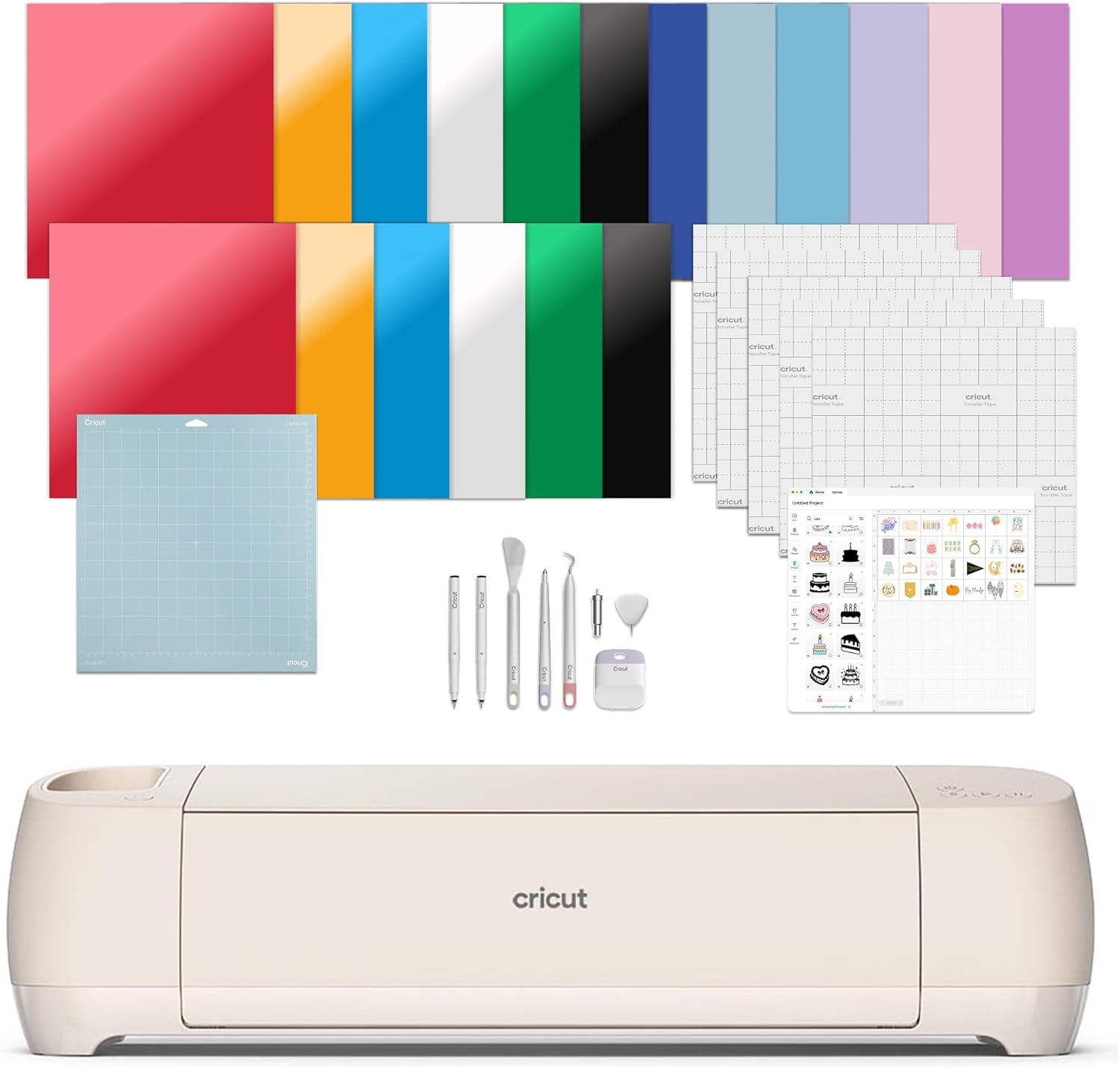
Smart Cutting Machine 30 Image Design – Best DIY Craft Machine
Smart cutting machine Cricut Explore 4 bundle includes vinyl, HTV, tools, mats, and digital designs to start crafting instantly.

🔹 Highlights
- ✂️ Smart Cutting Machine – Cuts, draws, scores, foils, and more
- 🎨 Works with 100+ materials including vinyl & HTV
- 🖨️ Print-Then-Cut compatible with inkjet printers
- 🧠 Beginner-friendly Design Space software
- 📦 Engagement bundle with tools, mats & materials
- 💍 Ideal for crafts, events, and personalization
🔖 Deal Summary
Smart cutting machine by Cricut Explore 4 – DIY Craft for creators who value precision, flexibility and ease of use. Able to craft with more than 100 materials, it cuts vinyl, iron-on HTV, card stock, stickers and beyond plus it works as a drawing tool, score (a pen draws lines for pleats or folds), and a foiling device.
This Cricut cutting machine contains necessary tools, supplies and digital content to start creating now. With the easy-to-use Cricut Design Space app, beginners can design and create projects for everything from parties and events to weddings, décor and home renovation! Whether you make for parties or just for everyday creativity, the Explore 4 has a great balance of capability and approachability.
Here is the Detailed Video Review of Smart cutting machine 30 Image Design by Cricut Explore 4 for Hands-On!
⭐ Key Features – Cricut Cutting Machine
✂️ Multi-Function Smart Cutting – Cuts, draws, scores, and foils with precision for a wide range of DIY projects
🎨 Supports 100+ Materials – Works with vinyl, iron-on HTV, cardstock, stickers, and specialty materials
🖨️ Print-Then-Cut Capability – Create full-color stickers and designs using compatible inkjet printers
🧠 Design Space Software – Easy-to-learn app with free images, fonts, and projects for beginners
📚 Expandable Content Library – Access thousands of designs with optional Cricut Access subscription
📦 Complete Engagement Bundle – Includes mats, tools, pens, vinyl, iron-on, cardstock, and transfer tape
💍 Event & Personalization Ready – Ideal for engagement décor, gifts, invitations, and custom apparel
📦 What’s Included
📦 Cricut Explore 4 Smart Cutting Machine
📦 Fine-Point Blade
📦 Light Grip Machine Mat
📦 2 Fine-Point Pens
📦 Mini Weeder
📦 Scoring Stylus
📦 Scraper & Spatula
📦 Weeder
📦 Smart Iron-On HTV
📦 Smart Vinyl
📦 Cardstock
📦 Transfer Tape
📦 Materials for practice cut
📦 30 digital images in Design Space
💰 Value-Focused Intro
Why price matters here
Smart cutting machines vary widely in material support, software ease, and included accessories. In this category, value is determined by versatility, learning curve, and how much you can create without buying extras. The Cricut Explore 4 focuses on flexibility and beginner accessibility rather than professional-only features.
📦 What You Get for the Money
Inclusions
The bundle provides both hardware and essential tools, materials, and digital content, allowing users to start crafting immediately.
Warranty
Cricut provides manufacturer-backed warranty coverage for the machine under normal use.
Support
Users gain access to Cricut’s tutorials, community projects, Design Space updates, and customer support.
⚖️ Where It Cuts Corners
Honest trade-offs
This model does not cut very thick materials like wood or leather, which are reserved for higher-end Cricut machines. Some premium designs require an optional subscription.
🏁 Final Value Verdict
Buy / Wait / Skip
Buy – if you want a versatile, beginner-friendly cutting machine with a strong starter bundle.
Wait – if you’re comparing Explore vs Maker series machines.
Skip – if you need heavy-duty cutting for thick or rigid materials.
📊 Comparison Table
| Feature | Cricut Explore 4 | Typical Entry-Level Cutter |
|---|---|---|
| Materials Supported | 100+ | 20–30 |
| Print-Then-Cut | ✅ Yes | ❌ Limited |
| Drawing & Scoring | ✅ Yes | ❌ No |
| Software | Design Space (Free + Optional Paid) | Basic |
| Bundle Value | Extensive | Minimal |
📦 What’s Included
- ✂️ Cricut Explore 4 Smart Cutting Machine
- 📦 Essentials & Materials Bundle
- 🧵 Smart Vinyl, Smart Iron-On HTV, Cardstock
- 🧱 LightGrip & StandardGrip Mats
- 🛠️ Weeder, Scraper, Spatula, Scoring Stylus
- 🖊️ Fine-Point Pens & Blade
- 🎨 25 + Bonus Digital Images
👍 Pros & Cons
✅ Pros
- Excellent starter bundle value
- Beginner-friendly software
- Supports wide range of materials
- Strong community & tutorials
- Reliable Cricut ecosystem
❌ Cons
- Optional subscription for full design library
- Inkjet printer required for Print-Then-Cut
- Not as fast as Cricut Maker series
👍 Why We Recommend It
- ✔ Ideal for beginners & hobbyists
- ✔ Great balance of features & price
- ✔ Ready-to-use bundle
- ✔ Trusted Cricut quality
- ✔ Scales well for small crafting businesses
Looking for Fit bit Inspire 3 Health & Fitness Tracker?
🔧 Recommended Usage Tip
🔹 Start with simple vinyl or cardstock projects to learn cutting pressure and mat placement. Always load materials according to Design Space prompts and use test cuts for new materials. Keep blades clean and store mats covered to maintain grip and accuracy over time.
❓ Frequently Asked Questions (FAQs)
Is the Cricut Explore 4 good for beginners in USA?
➤ Yes, it is designed to be easy to learn with guided software and included starter tools.
What materials can it cut?
➤ It works with vinyl, iron-on HTV, cardstock, stickers, and over 100 other materials.
Does Cricut cutting machine require design experience?
➤ No, Design Space is beginner-friendly and includes free images and fonts.
Can it make stickers?
➤ Yes, it supports Print-Then-Cut with compatible inkjet printers.
Is a subscription required?
➤ No, it works without a subscription, but Cricut Access is optional for more designs.